Register SIM

Register your SIM

You will need:

ID/Passport

You will need a scanned version of your ID or passport to upload

Standard SIM

You will need the physical SIM card to view the ICCID number

ICCID number

You will need the 19 digit number located under the barcode on your SIM card eg. 89264048310000XXXXX
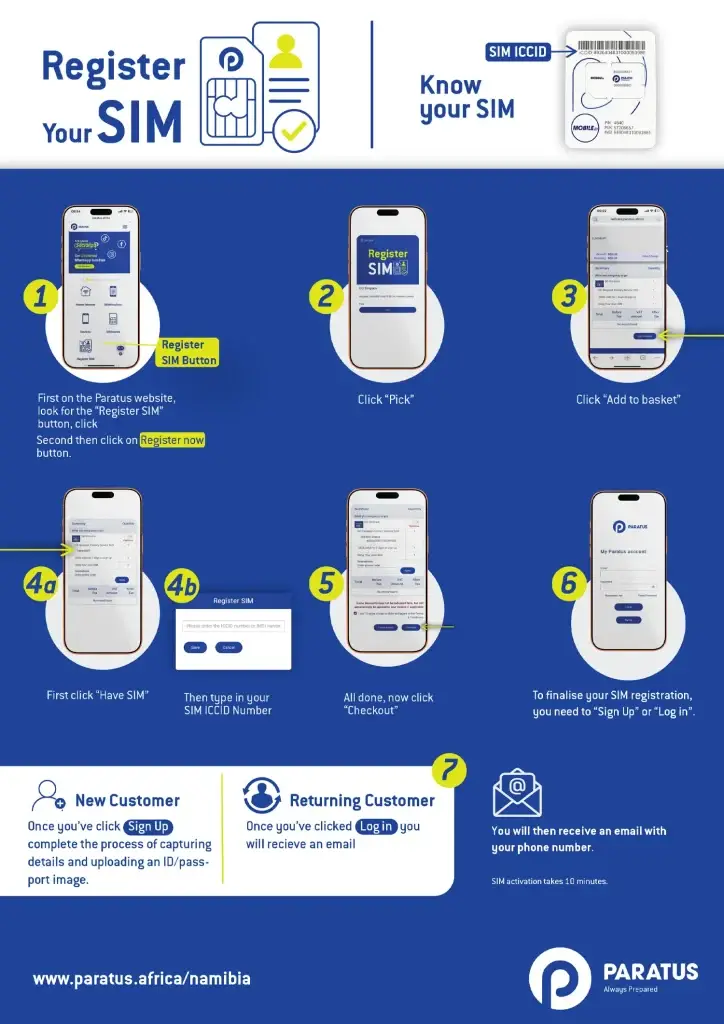
How to register your SIM:

1
Click the button for Register SIM and click Pick. A basket will be created.
2
Click on Have SIM? and enter the SIM ICCID number.
3
Once the SIM ICCID number is confirmed, click Checkout and follow the steps on screen.
4
Existing customers will log in. New customers will sign up.
5
New customers will complete the process of capturing details and ID/passport image.
6
A verification email will be sent and needs to be confirmed.
7
Once completed, you will receive your phone number via email. SIM activation takes 10 minutes from confirming the verification email.
To see the full how-to guide, click here.
1
Click the button for Register SIM and click Pick. A basket will be created.
2
Click on Have SIM? and enter the SIM ICCID number.
3
Once the SIM ICCID number is confirmed, click Checkout and follow the steps on screen.
4
Existing customers will log in. New customers will sign up.
5
New customers will complete the process of capturing details and ID/passport image.
6
A verification email will be sent and needs to be confirmed.
7
Once completed, you will receive your phone number via email. SIM activation takes 10 minutes from confirming the verification email.
To see the full how-to guide, click here.
Register SIM